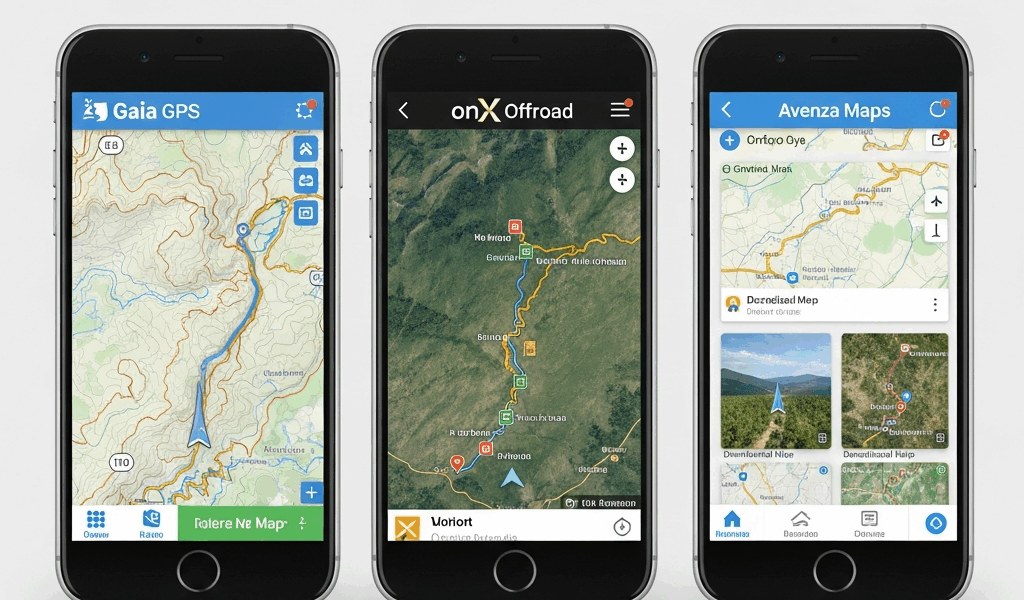
Gaia GPS vs onX Offroad vs Avenza — Which Navigation App Is Right for Your Trip
Overlanding navigation has gotten complicated with all the half-baked app recommendations flying around from people who’ve never aired down a tire in their lives. As someone who’s run all three of these apps — sometimes simultaneously on the same trip — across BLM land in Utah, USFS roads in the Gifford Pinchot, and a particularly humbling stretch of the Mojave Road where I made a routing call I still think about, I learned everything there is to know about what separates a legitimate overlanding nav app from a hiking app wearing a hard hat. The goal here isn’t interface design or icon aesthetics. Overlanders don’t care about that. What matters is whether the app can tell you if a road is gated, who owns the land you’re about to camp on, and whether you can pull a complete offline map for an entire region without burning your data plan at the trailhead.
There are four things that separate a real overlanding navigation app from a road trip app dressed up in a rugged case. Miss two of them and you’ve got a very expensive compass.
What Overlanders Need From a Navigation App — That Hikers Don’t
Frustrated by a locked gate 38 miles down a dirt road in the San Rafael Swell — no cell service, a truck that couldn’t turn around easily, and a whole afternoon evaporating — I started paying much closer attention to what navigation apps actually provide versus what they claim to provide. There’s a difference. A big one.
The four things overlanders genuinely need are:
- Large offline map downloads — not just a 10-mile buffer around a route, but entire states or regions you can pull before you leave the driveway
- Land status data — clear, accurate boundaries showing BLM, USFS, state trust lands, tribal land, and private property so you know where dispersed camping is legal before you drive to it
- Road classification and gate status — difficulty ratings, vehicle requirements (2WD accessible, 4WD required, ATV only), and whether gates are locked or open seasonally
- Community condition reports — recent trip notes from other overlanders that tell you the road is washed out or the seasonal closure is still active
Hiking apps handle offline maps reasonably well. They completely ignore the other three. Standard car navigation apps solve none of them. Even some apps marketed specifically at overlanders only nail one or two. That’s the baseline for this comparison.
Probably should have opened with this section, honestly — because once you understand these four criteria, the comparison basically writes itself.
Gaia GPS — Best for Detailed Map Layers
Gaia GPS runs $19.99 per year for the premium tier. That’s what you need if you want full offline downloads and access to the map layer library — which is honestly the whole point of Gaia.
But what is Gaia GPS, really? In essence, it’s a layered mapping platform built for serious trip planners. But it’s much more than that. You can stack USGS 7.5-minute topo quads, ESRI satellite imagery, USFS Motor Vehicle Use Maps — the official MVUMs showing which roads are legally open to motorized travel — slope angle shading, and custom condition overlays all at once. On a complex trip across multiple ranger districts with different road systems and terrain types, nothing else on the market comes close to Gaia’s depth. I’ve used it to cross-reference MVUM data with topo contours and satellite imagery simultaneously — trying to figure out whether a particular ridge line route was actually driveable — and that multi-layer workflow is where Gaia earns its subscription fee every single time.
Offline downloads are strong. Entire states, large regional areas, pulled as packages before you leave. The download interface is functional if not elegant — you draw a bounding box, select your map sources, run it on WiFi at home. Done. That’s what matters when you’re planning a three-week run through the Great Basin.
The limitations are real, though. Gaia carries zero gate or lock status data. None. You can see a road exists and you can see its general MVUM classification, but whether there’s a locked Forest Service gate waiting at mile three — Gaia simply doesn’t know. Community route data quality is inconsistent, too. Some routes have detailed recent condition notes. Others haven’t been touched since 2019. For terrain analysis and multi-layer route planning, Gaia is the most powerful option available. For knowing what you’ll actually encounter when you arrive, it has gaps worth knowing about before you commit.
Who Gaia GPS Is Actually For
Serious route planners. People building complex itineraries across multiple land management units who need to cross-reference several authoritative data sources at once. Photographers and trip leaders doing recce work before bringing a group out. If your planning process involves downloading a dozen map layers and spending two hours on a laptop before a trip, Gaia is built for exactly that workflow.
onX Offroad — Best for Land Status and Road Classification
onX Offroad runs $29.99 per year. More expensive than Gaia. For one specific category of overlanding need, it’s worth every dollar of that price difference — and then some.
The irreplaceable advantage onX has over every other app here is land ownership data combined with gate status. onX shows you who owns each parcel — private, BLM, USFS, state, tribal, county — with boundaries accurate enough to actually rely on when you’re making dispersed camping decisions at 9pm on a Thursday. This isn’t approximate shading. Parcel-level ownership data. The kind that tells you whether you’re on legal camping ground before you pull off the road and start unloading the rooftop tent.
Gate status is the feature that nothing else replicates. onX maintains regularly updated data on road gates — locked, open, seasonal closures. Knowing before you leave whether the gate at mile three is currently locked isn’t a small thing. It’s the difference between a successful trip and a very long, very frustrating afternoon of backing out on a one-lane road. Don’t make my mistake. I made it once with an app that didn’t carry gate data, and once was genuinely enough.
Road classifications in onX are practical and specific — 2WD accessible, high-clearance 2WD, 4WD required, ATV only. These aren’t vague difficulty ratings. They’re vehicle requirement categories that tell you whether your rig can actually make it before you’ve committed to 40 miles of no-return dirt road.
The map layer options are less extensive than Gaia’s. You won’t get the same depth of stacked reference layers. Offline downloads work well for regions and states. Community trip reports exist, but the ecosystem is smaller. If pure map layer depth is your priority, onX loses that comparison. If legal land access and road reality data are your priority — and for most overlanders focused on dispersed camping, they should be — onX wins without much argument.
Who onX Offroad Is Actually For
New overlanders who need to learn public land geography fast. Experienced overlanders traveling in new regions where they don’t know the land status patterns. Anyone whose trips center around dispersed camping on BLM or USFS land. Anyone who has ever driven a long way to find a locked gate. Especially that last group.
Avenza Maps — Best for Free Official Government Maps
Avenza is free. The app costs nothing, and a substantial library of official government maps costs nothing to download through the Avenza Map Store. That’s the value proposition, stated plainly.
But what is Avenza? In essence, it’s a georeferenced PDF viewer with a GPS overlay. But it’s much more than that for a certain kind of overlander. You download an official USFS Motor Vehicle Use Map, a BLM recreation map, or a state topo — and Avenza shows your GPS position on top of it in real time. For someone who wants the exact same map the ranger hands out at the district office, printed on actual paper and folded incorrectly into a glove box, Avenza delivers it free on your phone. That document is the authoritative, legally current record for road status in that specific area. Apparently that matters to some people — it should matter to everyone.
The limitations define what Avenza is not. No routing. No turn-by-turn navigation. No community condition reports. No land status layer beyond whatever’s printed on the PDF you’ve downloaded. No gate status data. No road classification database. It is not a navigation platform in the modern sense. It is a very good, very reliable way to carry official government maps on your phone with your position shown on them. Full stop.
For a budget overlander doing a single trip in one ranger district — downloading the MVUM for that specific area ahead of time and just wanting to know which roads are open to motorized travel — Avenza works. For anything more complex than that, the limitations become friction fast.
Who Avenza Is Actually For
Budget-conscious overlanders who want official maps without a subscription. Overlanders doing day trips or single-district explorations where one official PDF covers the territory. People who specifically want the ranger-district-published document, not an interpreted or aggregated data layer built by a software company in Denver.
Verdict — Which App for Which Overlander
Here’s how this actually breaks down in practice.
New overlander, primary concern is camping legally on public land and not driving into private property or locked gates: start with onX Offroad at $29.99 per year. The land status data and gate information will save you more grief in the first year than any other feature any app offers. That’s not a close call.
Serious multi-day route planning across complex terrain with multiple land management units — needing to cross-reference detailed topo, satellite, and MVUM data simultaneously: Gaia GPS at $19.99 per year is the tool. It’s genuinely more powerful for that specific workflow. That’s what makes Gaia endearing to us map nerds who plan trips from a laptop at the kitchen table on Tuesday nights.
Want official government maps at zero cost, doing a focused trip in a single area where you can download the specific USFS or BLM PDF ahead of time: Avenza is free and it works.
The combination most experienced overlanders land on is running both onX Offroad and Gaia GPS together. Combined cost — $49.98 per year. Less than $4.20 per month. onX handles land status and road viability before and during trip planning. Gaia handles detailed navigation and terrain analysis in the field. The two apps aren’t redundant. They cover different ground, almost literally.
All three have free tiers or trial periods. Download all three before your first serious trip. Run them on the same route and see which data each one shows you — and which gaps each one has. The workflows are different and one will fit your planning style better than the others.
What I’d tell someone new to overlanding, based on two years of running these apps across desert, mountain, and forest terrain: don’t optimize for the nicest interface. Optimize for the app that tells you the thing you need to know before you’re 40 miles down a dirt road with no cell service and a locked gate sitting in your headlights. That’s onX. Everything else is secondary to that.



Stay in the loop
Get the latest trail owl updates delivered to your inbox.